Freitag, 29. Juni 2012

9 Tasty Foods Named After People

9 Tasty Foods Named After People 


Ever wonder what it takes to get your name permanently affixed to a dish? It doesn’t hurt to invent a new delicacy that people just can’t stop eating, but for some people it’s just been a matter of being in the right place at the right time—and complimenting the chef on a job well done. Here are nine foods named after people, including Margherita pizza, Graham crackers, and nachos (yes, nachos).

1. Chicken a la King


chicken-a-la-king

While some stories trace the savior of leftover chicken’s roots back to London’s Claridge Hotel or the famed restaurant Delmonico’s, one particular tale is widely accepted. As the story goes, a chef named George Greenwald ran the restaurant at the ritzy Brighton Beach Hotel in Brooklyn around the turn of the 20th century. Greenwald liked to experiment in the kitchen, and one night he turned out a special chicken dish for the owners of the hotel. The proprietor and his wife adored the dish and encouraged Greenwald to add it to his menu. Greenwald was so delighted that his boss liked his new creation that he named it after the hotelier: E. Clark King.

2. Graham crackers

gc

Sylvester Graham would not have gotten along very well with James Salisbury. Graham, a 19th-century diet proponent, felt that people should ingest mostly fruits, vegetables, and whole grains while avoiding meats and any sort of spice. The upside of all of this bland food sounds a bit curious to the modern reader: Graham thought his diet would keep his patients from having impure thoughts. Cleaner thoughts would lead to less masturbation, which would in turn help stave off blindness, pulmonary problems, and a whole host of other potential pitfalls that stemmed from moral corruption. Graham invented the cracker that bears his name as one of the staples of this anti-self-abuse diet.

3. Salisbury Steak

steak

James Salisbury was a 19th-century American doctor with a rather kooky set of beliefs. According to Salisbury, fruits, vegetables, and starches were the absolute worst thing a person could eat, as they would produce toxins as our bodies digested them. The solution? A diet heavy on lean meats. To help his diet cause, Salisbury invented the Salisbury steak, which he recommended patients eat three times a day and wash down with a glass of hot water to aid digestion. Apparently the only people paying attention to the doctor’s orders were elementary school lunch ladies.

4. Cobb salad

cobb

Here’s a debate so fiery that even Curb Your Enthusiasm has tackled it. Although there are numerous origin stories for this main-course salad, it seems that most people generally agree the concoction bears the name of Robert Cobb, the former proprietor of Hollywood’s Brown Derby restaurant.

There are a number of stories about how Cobb actually invented the salad, though. The one most frequently repeated is that in 1937, a hungry Cobb went to his restaurant’s kitchen for a midnight snack and ended up improvising a delicious salad with what he found in the fridge. His buddy Sid Grauman, the owner of the landmark Grauman’s Chinese Theater, was with Cobb on the night he got the munchies, and started ordering “Cobb’s salads” when he came in to eat at the Brown Derby.

5. Beef Stroganoff

stroganoff

The creamy beef dish supposedly takes its name from Count Pavel Stroganov, a 19th-century Russian statesman and military leader who commanded a division in the Napoleonic Wars. Stroganov’s family was one of Russia’s most wealthy and influential, so he certainly had the clout to get a namesake dish. It’s not totally clear, though, at what point the dish sprang into existence. Some sources credit an 1890 culinary competition—which seems unlikely because Count Pavel was long dead at that point—but the beef dish is mentioned in written records at least as far back as the 1860s.

6. Nachos

nachos

Yep, there really was a guy named Nacho. In 1943 Ignacio Anaya—better known by his nickname “Nacho”—was working at the Victory Club in Piedras Negras, Mexico, just over the border from Eagle Pass, Texas. As the story goes, there were a lot of American servicemen stationed at Fort Duncan near Eagle Pass, and one evening a large group of soldiers’ wives came into Nacho’s restaurant as he was closing down.

Nacho didn’t want to turn the women away with empty stomachs, but he was too low on provisions to make a full dinner. So he improvised. Nacho Anaya supposedly cut up a bunch of tortillas, sprinkled them with cheddar and jalapenos and popped them in the oven. The women were so delighted with the nachos especiales that the snack quickly spread throughout Texas.

7. Fettucine Alfredo

noodles


The Italian favorite has been around for centuries, but it supposedly took on its current form around 1914 when Alfredo di Lelio upped the amount of butter in the recipe in an attempt to find something his pregnant wife would enjoy eating. Di Lelio realized that his buttery cheese sauce was extraordinarily tasty, so he started serving it to tourists at his Rome restaurant and named the dish after himself.

8. Margherita pizza

margherita-pizza

This deliciously simple pizza is named after Margherita of Savoy, who was Queen consort of Italy from 1878 until 1900 during the reign of her husband, King Umberto I. In 1889, Umberto and Margherita took a vacation to Naples and visited renowned pizza chef Raffaele Esposito, who cooked the royal couple three special pizzas. Margherita particularly enjoyed one that had used mozzarella, tomato, and basil to mimic the colors the Italian flag, so Esposito named the dish in her honor.

9. Bananas Foster

bananas-foster


In 1951, Richard Foster had a tough job. He was the chairman of a New Orleans crime commission that was trying to clean up the French Quarter, and he also ran his own business, the Foster Awning Company. When Foster was hungry, he would often head in to his friend Owen Brennan’s restaurant, Brennan’s, and happily wolf down whatever chef Paul Blange was making. When Chef Blange invented a new dessert of flaming bananas, he named it after his owner’s buddy and frequent customer.

Read the full text here

Mittwoch, 27. Juni 2012

Yarn Bombs! 51 Victims of Knitted Graffiti

Yarn Bombs! 51 Victims of Knitted Graffiti


Yarn bombing is graffiti that grandmothers approve of! They consist of quickly knitted additions to street objects and sculptures. Why? Because it’s fun! (Telephone Box viaKnittheCity additional links and credits below).


(Images via whodunknit, marialyng, tumblr, streetartutopia, twilighttaggers)

Yarn bombers often have a political or social message they’d like to convey. More often than not, that message is simply “enjoy this,” as these urban knitters tend to be out for some fun.

(Images via rebelyarns, reginaurbanecology, apartmenttherapy, flickriver, tribal-times)

Trees get cold if they’re not given a sweater; at least, this must be how yarn bombers think, considering how much joy they get out of wrapping tree trunks in festive knitwear.

(Images via ajoureblog, cultureshockart, ajoureblog)

To knit something in a public space requires a lot of skill and speed. The result always brings a smile to people’s faces. It’s hard not to grin when a seat on the subway has been given a homey knitted treatment.

(Images via fiveluckyducks, baycitizen, threadologie, apartmenttherapy)

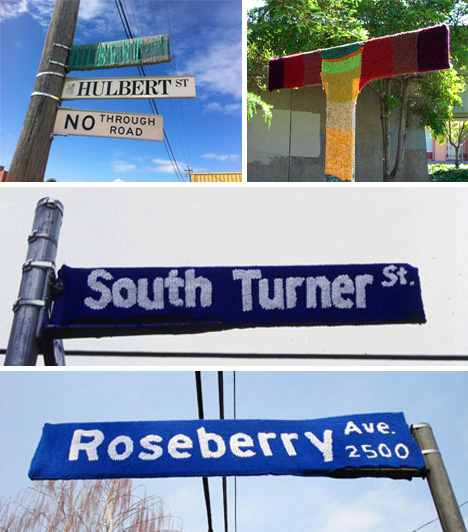
Yarn bombers like to show off their skills with careful and accurate lettering… so accurate, that one could ditch the original street sign without a problem.

(Images via streetartutopia, whodunnknit, rustbelt1, tangleknot, ymlp, followthedotxoxo)

Public statues are sitting ducks for legions of yarn bombers. They’ll come out in the off hours and swarm over public art to turn it into something even more interesting.

(Images via yarnbombing, zezaflor, shift, buttertoastboutique, streetartscene, knitthecity)

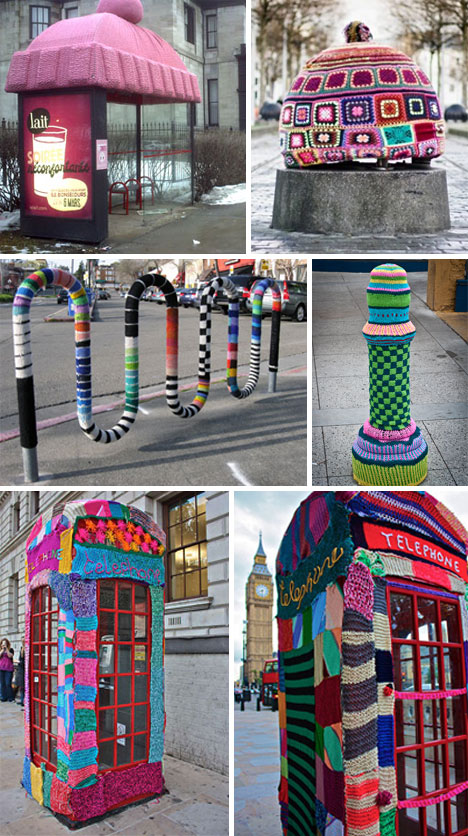
Functional street objects need a little love now and then. Careful knitting will plaster them with colorful creations and turn them into something a lot less cold and utilitarian.

(Images via unfinishedprojectparty, rebelyarns, theowlerychronicles, yarnbombing, , soenyun,lakewood)

Street lights and telephone poles don’t have a chance. Some yarn bombers like to add a little flair to otherwise mundane objects. Any kind of standing structure is at risk.

(Images via flickriver, reducethepanic, recorked4u, thinng, maiyamayhem, poppygall)

Fences and rails require a different style of knitting, but that doesn’t deter the hardcore yarn bombers, who endeavor to spice up every aspect of their beloved city.

(Images via myknitche, minispace, buzzfeed, yarnbombing, telegraph,theknitterslifelist, globalgraphica)

Now these are eye-catching! Imagine a bus driver leaving their ride out for a few days and coming back to see it in dazzling color. Some of these rides can still be driven, though one hopes they’re able to stay out of the rain!

(Images via bilerico, passagesnorth, yarnbombing, scissorsandspice, nick0lson)

Most people have their bike stolen when they leave it on the street. The lucky ones just have it decorated.

Dienstag, 26. Juni 2012

Everything is backwards,

Just look at us. 


Everything is backwards,

Everything is upside down,

Doctors destroy Health,

Lawyers destroy Justice,

Universities destroy Knowledge,

Governments destroy Freedom,

The major media destroy Information

and Religions destroy Spirituality.

In some ways this speech is prophetic !!!!!!

TRY TO TAKE OUT ABOUT AN HOUR TO WATCH THIS ....THIS GIVES A LOT ABOUT HOW THINGS ARE WORKING AND WHAT HAVE TO BE CHANGED.

In some ways this speech is prophetic , as Gadaffi identifies the very inequities inherent in the UN that were to become the instruments of his murder & the annihilation of Mankind.


The control & abuse of the 'security' council & 'permanent member' status by a small number of countries which have granted these special powers to themselves!

The repeated use of the UN security council to commit wars of aggression which serve only the interests of the small number of powerful groups controlling the UN.

Colonisation continues to this day & is assisted by a corrupt & captive United Nations & it's NATO thugs.

In other ways, this speech is naive in his open hearted acceptance of Obama who had just come to power.

The official translation of this speech was appalling so I have uploaded this version which I found on an archive of Gadaffi's own website which was attacked & taken down.

Here is the link for his videos & mp3's in Arabic, Chinese, English, French, German, Japanese, Portugese, Russian & Spanish.

http://www.archive.org/details/algathafi-org-audio-video-201108

Sonntag, 24. Juni 2012

11 Insane Features of Normal Human Anatomy

11 Insane Features of Normal Human Anatomy 


Sure, we’ve wowed you with medical oddities, but why should abnormal bodies get all the attention? The truth about the normal human body can be stranger than fiction. To prove it, here are 11 weird facts about the body you thought you knew.

1. Your Tongue


What does your tongue have in common with an octopus’ tentacle and an elephant’s trunk? All three are examples of a unique structure called the “muscular hydrostat,” a bundle of muscles that work without the assistance of bones. Like anything made mostly of water, the hydrostat has a constant volume, so when certain cells contract, the whole thing has to expand somewhere else. The result is a body part that is both strong and flexible. If your tongue were as big as an elephant’s trunk, it could uproot trees too.

2. Your Hyoid Bone

This wee, horseshoe-shaped bone will never appear in the song by James Weldon Johnson, as it’s connected to…no bones at all, in a meaningful sense; its job is independent of the rest of the skeleton. Also known as the lingual bone, the hyoid bone sits atop the larynx, providing an anchor for the muscles on the floor of the mouth, the tongue. Don’t worry: you’re not likely to break this bone, unless someone starts choking you to death. At that point, you’ve got bigger problems.

3. Your Philtrum

No, that little indent under your nose isn’t there to make it difficult to apply lipstick in the dark, but it doesn’t serve any other purpose either. The indent, called the philtrum, is just a residual reminder of your time in the womb: in utero, the two sides of your face develop independent of one another, then join at the middle. When the two sides fail to fuse properly, the result is a cleft palate, which occurs in about 1 of every 750 births. Ancient Romans found the philtrum erotic, and named that lipstick-thwarting dip in the upper lip “Cupid’s Bow.” In fact, the word philtrum comes from a Greek term meaning “love potion.”

4. Your Hair

People love tossing around hair facts. That old wives tale about it growing after you’re dead? A fun fallacy. After you die, your hair and nails don’t continue growing, but the skin retreats as it dehydrates, causing that creepy illusion of ghoulish growth.

In truth, hair is a weird combination of living and dead. The living hair follicle pushes out the hair, which is made up of different kinds of non-living yet protective cells made of keratin — the same keratin that’s on your top (dead) layer of skin, and in your nails. When your hair turns grey, it means your pigment cells are dying. Yet another hairy reminder of your own mortality.

5. Your Nails

Ever notice how your toenails grow more slowly than your fingernails? That’s because there’s an evolutionary correlation between the length of your “terminal phalanges” (the outer-most bones in your toes and finger-tips) and the rate at which your nails grow. The tips of your toes are shorter than your fingertips, so your toenails don’t grow as fast. In the same way, the nail on your middle finger will grow faster than the nail on your pinky. The seemingly random correlation has to do with the lessening necessity of claws through human evolution. If your fingernails are thick and grow quickly, ask yourself the question: “Should I be digging more?”

6. Your Bioluminescence

Fireflies and jellyfish glow, but humans? Believe it. The phenomenon is a natural byproduct of the metabolic process, and scientists have long been aware of the presence of bioluminescence in most living creatures. But it wasn’t until 2009, when a team of Japanese researchers developed a camera 1000 times more sensitive than the human eye, that human bioluminescence was captured on film. The light show apparently works on a 24-hour cycle — brightest in the late afternoon and on the cheeks, forehead and neck. Next time someone tells you “you’re glowing,” you can take it literally.

7. Your Walking Proteins

Of the microscopic menagerie that is your cell biology, the most bizarre member is perhaps the kinesin protein, a “motor” protein whose job it is to deliver important molecules to their necessary cellular destinations. What’s most remarkable is the kinesin’s mode of transportation: It “walks” along its micro-pathway using two structures at its base commonly referred to as “feet.” Though scientists disagree as to exactly how these feet were “made for walking,” there’s no denying that the mode of transportation closely resembles that of the humans they assist.

8. Your Sonic Hedgehog

What’s more complex than cell biology? Cell biology in your infinitely complex brain. In 1993, scientists discovered a protein in the hippocampus instrumental in developing a variety of neural traits. Isolated in fruit flies, the protein causes spines to grow on the back, so the scientists named it “Sonic” after the spiny Sega Genesis character. Similar proteins are named desert hedgehog and Indian hedgehog. Who says scientists don’t have fun?

9. Your Liver

The lumpy, lobey, unwieldy liver gets a bad rap, but if you didn’t have it in there cleaning out your system, you’d be looking pretty bad yourself. Lucky for you, the liver is perhaps the most resilient of the major organs: it can regenerate from only 25% of its tissue mass. You wouldn’t vote it the cutest kid in school, but “Most Likely to Succeed”? Maybe.

10. Your Vomeronasal Organ

There are important organs, and there are ones just along for the ride. As far as useless leftover body parts, you’ve probably heard about the tailbone, the appendix, even the little toe (wee wee wee all the way home). But you may not have heard of the “vomeronasal organ,” located unglamorously inside the nose.

Back in the day, the little guy used to aid in detecting subtle airborne information, most importantly, pheromones from a member of the opposite sex. In the age of modern man, the vomeronasal organ doesn’t appear to be doing much — it doesn’t even have nerves connecting it to the brain. Still, scientists continue to argue about the potential chemical messages it might be sending, titillating that part of us that is still animal.

11. Your Sexy Bits

And speaking of pheromones and vestigial organs…

Men and women have more in common “down there” then you might think. Because the sex organs of a fetus don’t develop until about five months into development, males and females have remnants of the opposite sexual organs — and some are more useful than others. While the penis is basically an enlarged version of a lady’s clitoris, the male remnant of the lower vagina is less useful. Called the prostatic utricle (Latin for “pouch of the prostate”), the little-discussed fleshy sac just kind of hangs out near the prostate gland, leading nowhere. In the 1800s, the structure was more commonly called the vagina masculina, which requires no translation.

From Text Neck to Hogwarts Headache: 6 Injuries for the Modern Era

From Text Neck to Hogwarts Headache: 6 Injuries for the Modern Era


Our shiny new gadgets (and one teen wizard) are proving once again that human beings are really easily breakable.

1. Text Neck


Texting image via Shutterstock

Do you have shooting pains down your neck and arm, as well as numbness or tingling in your fingers and hand? If you’re over forty, you might want to call an ambulance — you could be having a heart attack. If you’re younger than that, though, it could be the fashionable new injury among cell phone users: text neck. Yes, it seems that the act of hunching over our phones for most of our waking hours might actually have some negative side effects.

Back pain clinics and chiropractors in North America and Europe are reporting seeing thousands upon thousands of text neck cases. One chiropractor, Dean L. Fishman, has seen so many injuries directly caused by over-texting that he now specializes in their treatment, registering the term and opening the Text Neck Institute. He also trains other chiropractors in how to fix the problems resulting from the fact that we all really hate actually speaking to other people. Fishman calls text neck a “global epidemic” and claims his youngest patient is three years old. The Institute’s website describes the problem like this:

“Looking down at the screen on their hand held mobile device for long periods of time… will cause changes in the curve, supporting ligaments, tendons, and musculature, as well as the bony segments. Eventually there may be nerve involvement, muscle spasms and pain.”

So pretty soon we’re all going to be mute hunchbacks that can’t feel their fingers. Awesome. Speaking of fingers…

2. BlackBerry Thumb (aka Nintendo Thumb)

BlackBerry image via Shutterstock

BlackBerry Thumb is such a prevalent malady among businessmen and women that it has been covered everywhere from Wired to Consumer Reports. Since phones with built-in keyboards are awkward to type on using our fingers, we end up using just our thumbs. This in turn causes a repetitive strain injury, similar to carpal tunnel syndrome, that results in swelling, pain, and yet more numbness.

Dr. Alan Hedge of Cornell University explained to WebMD that thumbs are the least flexible part of our hands, and there is a reason we only use them to hit the space bar on an actual keyboard:

“[The thumb] is really designed as a stabilizer for pinch gripping with a finger. That is why you only have two of them, not eight. It is the fingers that have dexterity, not the thumb. If you’re trying to type War and Peace with your thumbs, then you’re going to have a problem.”

But BlackBerry Thumb is really just a new, hip rebranding of an older, nerdier tech injury: Nintendo Thumb. PC Magazine defined it as a “repetitive stress injury due to excessive video game playing [that] causes a swelling at the base of the thumb.”

Gamers still suffer from Nintendo Thumb, but there are even more modern ways for you to hurt yourself while playing video games.

3. Wii Wrist

Oversize Wiimote image via Shutterstock

As Nintendo invents new ways to keep us entertained, it also continues to highlight parts of our bodies that are especially fragile. After Nintendo Thumb came Wii Wrist, part of a larger group of painful “Wiinjuries.”

When the Wii first came out, there were lots of stories of individuals breaking televisions, tables, their fingers, and other people’s noses when the remote accidentally flew out of their grasp, or they weren’t paying attention and smacked their hands into things (or people). But over time those injuries lessened, mostly thanks to the wrist strap, and repetitive strain injuries and over-stretched muscles in the shoulder and wrist increased.

Even things that made the Wii more fun could impact your wrist, like the vibrating of the controller. Thankfully, wrists can be strengthened, and if you’re willing to put in the time and effort, with just a few minutes a day of special wrist exercises you can be cured of your Wiinjury forever!

4. Ear Bud Oblivion

Jogger image via Shutterstock

In the old days, if you wanted to rupture your eardrums while out walking, you needed to carry around a boom box. Now, however, you can discretely listen to Adele’s dulcet tones on full blast, your tiny earbuds ensuring drivers have no idea you can’t hear them coming.

The results of a study by the University of Maryland Medical School found that thanks to the increasing use of earbuds, pedestrian accidents have tripled since 2006. And we’re not talking just broken bones here; three-quarters of the incidents covered by the study were fatal. It’s not just the fact that you can’t hear cars coming; it’s also the general distraction of the music, making you less likely to check before you cross the street, for example. We all have it drilled into our heads in kindergarten to look both ways, but just stick some tiny plastic speakers in our adult ears and we forget all about it.

It’s becoming such a problem that New York, Oregon, Virginia, and California are even considering legislation — similar to laws limiting cell phone use in cars — which would ban pedestrians and cyclists from using distracting devices like phones or iPods while crossing streets or in traffic. In 2011, a bill in Arkansas attempting to make it illegal for all pedestrians to wear two earbuds at a time was withdrawn after a huge backlash.

5. iPad Shoulder

Cell phones? Wiis? iPods? Please, those injuries are for the unwashed masses. These days, the truly elite suffer from iPad Shoulder. Because it can be used to watch movies and read books, some people spend even more time hunched over their tablet than their phone. The resulting pain is bad enough that it warranted a study by Dr. Jack Dennerlein from Harvard University, whose results were published in the prestigious Work: A Journal of Prevention, Assessment, and Rehabilitation. He had study participants do a variety of everyday tasks on their tablets, then measured their postures with an “infrared three-dimensional motion analysis system.”

What Dr. Dennerlein found was that with tablets, you really can’t win. When viewing or reading, it’s best to prop your iPad up at the most extreme angle the case allows for (even the lesser angles can be bad for your posture). But if you start typing, you need to lay it flat, since typing at an angle can cause joint pain and inflammation. One thing we can safely say at this point, though, is that any gadget you own is eventually likely to cause you some sort of joint pain and inflammation.

6. Hogwarts Headache

© BrokenSphere / Wikimedia Commons

The only non-tech malady on this list, but a modern phenomenon nonetheless: a few years ago any cool kid who could read was suffering from Hogwarts Headache. The prestigious New England Journal of Medicine actually ran a letter from a physician noting the unfortunate side effect of children reading more, and for longer periods, than they ever had in their lives. Yes, thanks to a couple extremely long (ostensibly children’s) books, an increasing number of parents brought their kids to the doctors with tension headaches. Since it is rare for children to suffer from chronic headaches like that, the doctors were stumped.

Then one pediatrician, Dr. Howard J. Bennett, finally realized that all three of the headache-ridden children he saw in one week were obsessively reading the newly released Harry Potter and the Order of the Phoenix, a book that runs to over a quarter of a million words. Two of his patients refused to stop reading at their current rate, instead opting for a prescription to dull the pain. He noted that, “In all cases, the pain resolved one to two days after the patient had finished the book.”

So far there have been no reported cases of Bella Blackouts or Twilight Torpor.


--brought to you by mental_floss 

Montag, 18. Juni 2012

The Fog Warning | Boy Milking a Cow | Winslow Homer

The Fog Warning

  • Halibut Fishing
1885
  • Winslow Homer, American, 1836–1910


Boy Milking a Cow


Winslow Homer made his reputation in the 1860s with images of the Union troops during the Civil War and of the returning veterans afterward. In the late 1860s and 1870s he turned to lighter subject matter and found an equally enthusiastic audience for his paintings of healthy, handsome children playing in the country or at the seashore, and of adults enjoying leisure-time pursuits. However, perhaps feeling the need for more important subjects in his art, Homer spent 1881–82 in Cullercoats, England. Both a fishing village and an artists’ colony, Cullercoats provided Homer with more profound themes: the arduous lives of fishermen and their families. Shortly after returning to the United States late in 1882, he settled in Prout’s Neck, Maine, similarly both a fishing community and a pleasant summer resort, where he painted the local population and their work. The Fog Warning is one of three paintings he produced at Prout’s Neck in 1885 describing the lives of the North Atlantic fishermen. 

Like many of Homer’s 1870s images featuring farm children, The Fog Warning is a painting with a narrative, though its tale is disturbing rather than charming. As indicated by the halibut in his dory, the fisherman in this picture has been successful. But the hardest task of the day, the return to the main ship, is still ahead of him. He turns to look at the horizon, measuring the distance to the mother ship, and to safety. The seas are choppy and the dory rocks high on the waves, making it clear that the journey home will require considerable physical effort. But more threatening is the approaching fog bank, whose streamers echo, even mock, the fisherman’s profile. Contemporary descriptions of the fishing industry in New England make clear that the protagonist’s plight—the danger of losing sight of his vessel—was an all-too-familiar event.

The dramatic tension of The Fog Warning is all the greater because Homer does not specify the fisherman’s fate. However, Lost on the Grand Banks (1885, private collection), another painting in the Prout’s Neck series, shows that the fishermen’s peril was a deadly one. An account related in the 1876 history The Fisheries of Gloucester tells of the insidious horrors to which fishermen were prey and could well have served as a description of The Fog Warning: “His frail boat rides like a shell upon the surface of the sea . . . a moment of carelessness or inattention, or a slight miscalculation, may cost him his life. And a greater foe than carelessness lies in wait for its prey. The stealthy fog enwraps him in its folds, blinds his vision, cuts off all marks to guide his course, and leaves him afloat in a measureless void.”

Freitag, 15. Juni 2012

You know what's weird?

You know what's weird?

Donald Duck never wore pants. But whenever he's getting out of the shower, he always puts a towel around his waist.

I mean, what is that about? .......as Usual ........MK

Google Search is full of little helpful features - ||| - All Tips & Tricks

Google Search is full of little helpful features.
We put them all here so you don’t have to search for them.


All Tips & Tricks

Screenshot of Web History preferences

Web history

Web History offers you a log of websites you've visited, a timeline of your actions and the ability to search your own online history. Try it out at www.google.com/history.>

Start simple

No matter what you're looking for, our motto is "keep it simple." Start by entering a basic name or word. If you're looking for a place or product in a specific location, enter the name along with the town or zip code.

Try it out

Search

Use web friendly words

A search engine works by matching the words you enter to pages on the web. So using words that are most likely to appear on pages will yield the best results. For example, instead of saying my head hurts, say headache, because that's the term a medical website would use.

Try it out

Search

Less is more

Simple, one or two word search terms will usually give you the broadest results. Start with short search terms, then refine your results by adding more words.

Try it out

Search
Screenshot of 'to be or not to be' exact phrase query

Search with an exact phrase

Put quotation marks around words "[any word]" to search for an exact phrase in an exact order. Keep in mind that searching with quotes might exclude relevant results. For instance, a search for "Alexander Bell" will miss pages that refer to Alexander G. Bell.

Try it out 

Search “"to be or not to be"”

Use descriptive words

The more unique the word, the more likely you are to get relevant results. So [celebrity ringtones] is probably better than [celebrity sounds]. Keep in mind though, that even if the word has the correct meaning, if it's not the one most people use, it may not match the pages you need.

Try it out

Search

Don't worry about cases

Search isn't case sensitive. A search for new york timesis the same as a search for New York Times.

Try it out

Search
Screenshot of 'op-ed site:nytimes.com' site specific query

Search within a specific site

Precede your query with site: if you know you want your answer from within a specific site or type of site (.org, .edu). For example: site:edu or site:nytimes.com.

Try it out 

Search “op-ed site:nytimes.com”

Don't worry about punctuation

Search ignores punctuation. This includes @#%^*()=[]\ and other special characters.

Try it out

Search

Search by file type

Search for specific types of files, such as PDFs, PPTs, or XLS, by adding filetype: and the 3-letter file abbreviation.

Try it out

Search

Include or ignore words and characters in your search

Highlight common words and characters such as the and& if they are essential to your search (as in a movie or book title) by putting quotation marks "the" around them. You can also use the minus - sign to specify particular items you don't want in your results, like ingredients in a recipe.

Try it out

Search

Find related pages

Use the related: operator to find pages that have similar content by typing related: followed by the website address. For instance, if you find a website you like, try using related:[insert URL] to locate similar websites.

Try it out

Search
Screenshot of choosing recipes

Find recipes

After searching for a specific recipe or ingredients, select "Recipes" in the left panel to see recipe results.

Try it out 

Search “peanut butter broccoli noodles”

Search numbers in a range

Stay within your budget by searching only for items within a number range by putting a string .. between amounts.

Try it out

Search
Screenshot of converting miles to km

Get number conversions

Convert any measurement -- like miles to kilometers or ounces to liters -- by typing in the number and unit of measurement.

Try it out 

Search “miles to km”

Screenshot of query for 'time japan'

Get the time

To see what time it is anywhere in the world, search timeand the city or country.

Try it out 

Search “time japan”

Screenshot of conversion of USD to pesos

Get currency conversions

Get current exchange rates by searching [currency 1] in [currency 2].

Try it out 

Search “usd in pesos”

Search the web
in all languages

When you're searching, click "More search tools" on the left panel of your results page, then select "Translated foreign pages." The feature will choose the best language in which to search and deliver results translated back in English.

Try it out

Search
Screenshot of weather for Chicago

Check the weather

Search weather followed by a U.S. zip code or the name of any city in the world to get the current weather and forecast. Enter weather by itself to get the weather report for your current location.

Try it out 

Search “weather chicago”

Screenshot of GOOG stock quote

Get realtime stock quotes

Typing any ticker symbol into the search box will get you realtime stock quotes that update live in your search results. Click the link on the results page for a detailed market analysis from Google Finance.

Try it out 

Search “GOOG”

Check sport scores
and schedules

Get scores and schedules for your favorite NBA, NFL, NHL and MLB teams simply by typing the team or league into the search box.

Try it out

Search
Screenshot of Goggles identifying a book

Search with Goggles

Want to search the web using your mobile phone's camera instead of words? On an Android, open your Google Goggles app (on an iPhone, open the Google Search app and select Goggles), snap a picture of the item you want to search for, and wait for your results. No typing necessary.

Track your packages

Track your UPS, FedEx, or USPS packages by typing the tracking number directly into the search box. The results will show you the status of your shipment.

Try it out

Search
Screenshot of query 'define: loquaciousness' to show definition

Get definitions

Put define: in front of any word to get its definition.

Try it out 

Search “define: loquaciousness”

Screenshot of choosing image size

Search by
advanced image search

Use Advanced Image Search to find an exact size, color or type of photo or drawing. With the tools in the left panel, you can filter your search to include only photos with faces, clip art, high-res images or only images that are available for commercial use.

Try it out 

Search “mount mckinley”

Screenshot of query '100*3.14-cos(83)='

Calculate anything

Enter any math equation into the search box and we'll calculate your answer.

Try it out 

Search “100*3.14-cos(83)=”

Locate earthquake activity

Type earthquake in the search box and your results will feature U.S. Geological Survey info showing the time, place and magnitude of recent earthquakes.

Try it out

Search
Screenshot of BBQ results with map

Search by location

Add a zip code to the end of any place search likebarbecue ribs and get results showing the nearest rib joints, along with phone numbers, a map, and even reviews. If you don't include your zip code, we may suggest places near you.

Try it out 

Search “barbecue ribs 35201”

Search locations by
zip and area codes

Want to know where a given zip code or area code is located? Just type it into the search box.

Try it out

Search

Shop and compare

Use the "Shopping" link on the left panel on the results page to shop for products and compare prices across the web.

Try it out

Search
Screenshot of sunrise time in Baltimore

Get local sunrise/sunset times

To see the exact times of sunrises and sunsets in cities around the U.S. and the world, search sunrise or sunsetfollowed by the city name.

Try it out 

Search “sunrise baltimore”

Discover local business

To find a store, restaurant or other business in a given neighborhood, enter the type of business and the location and we'll deliver a list of nearby places, along with a map, reviews and contact info. If you don't include the location in your search, we'll just find locations close to you.

Try it out

Search
Screenshot of localized movie times

Get movie times

Search on a movie name or just movie to see theater locations and showtimes in your area.

Try it out 

Search “movie”

Read public domain books

Read the complete texts of public domain works likeMoby Dick for free by selecting "books" in the left panel of your search results.

Try it out

Search

Hone in on a particular range

To specify a particular number range, type .. then a space, then the numbers in your range. For example, if you're searching for cars with over 300 horsepower, search cars "300.. horsepower". Here are some other examples: "220.. V" or "1.. RPM" or "8000.. mAh" battery

Try it out

Search
Screenshot of query 'flights from chicago to denver'

Check flight schedules

To see flight schedules to or from a particular destination, type flights from or flights to followed by the city or airport of interest. You can also add another location withto or from and view the schedule for a specific route.*Flight schedule data is provided by OAG and QuickTrip by Innovata.

Try it out 

Search “flights from chicago to denver”

Research health conditions

To see information about a common disease or symptom, enter it into the search box and we’ll return the beginning of an expert summary. You can click through to read the entire article.

Try it out

Search
Screenshot of specific flight times for query 'frontier 667'

Check flight times

View live arrival and departure information for U.S. flights just by searching the name of the airline and the flight number.

Try it out 

Search “frontier 667”

Get world news

Search any topic and then click the "News" tab in the left panel to get news results from sources around the world.

Try it out

Search
Screenshot of map results for query '97232 map'

Search for an address

To map any location, type in the city name or zip code followed by the word [map], and you'll see a map of that location. Click on the map to see it on Google Maps.

Try it out 

Search “97232 map”

Similar terms

Get results that include synonyms by placing the ~ sign immediately in front of your search term. A search for Christmas ~dessert recipes, for instance, will return results for desserts, along with candy, cookies and other treats.

Try it out

Search
Screenshot of voice command feature

Search by voice

To search the web by speaking, tap the microphone button on the Google search box on your home screen, or press down for a few seconds on the physical search button on your phone to activate the "Speak Now" screen. Voice Search for Android supports Voice Actions on Android 2.2 (Froyo) and above.

Examine public data

Search demographic terms like population orunemployment rate, followed by a county, state or country, and you'll get instant data about your chosen location directly from the U.S. Census Bureau and the Bureau of Labor Statistics. From there, you can click through to compare rates in different locations.

Try it out

Search
Screenshot of finance charts

Get interactive financial info

To get interactive financial results, go to google.com on your iPhone or Android-powered device (2.1 or later) and search for your favorite stock symbol. You'll see an interactive graph shown on a card; you can switch views to different date ranges by tapping on the buttons below the graph.

Find medication information

Search the name of a generic or brand-name prescription drug and we'll display its summary and description. You can also click through to more info about side effects, dosage and precautions from the National Institutes of Health.

Try it out

Search
Screenshot of instant search predictions

Instant on mobile

Google Instant on mobile makes search faster by displaying not just predictions but actual search results as you type. The beta version is available for most iPhone and Android devices in the U.S. To try it, go to google.com in your phone's browser and tap the Google Instant "Turn on" link beneath the search box (if you don't see the "Turn on" link, try waiting a moment and then refresh the page).

Screenshot of search results preview

Use instant preview on mobile

Google Instant Previews is available on mobile for Android (2.2+) and iOS (4.0+) devices across 38 languages. Like the desktop version of Instant Previews, you can visually compare search results from webpage snapshots, making it easier to choose the right result faster.

Screenshot of nearby search

Search by location

If you want to find sushi nearby, go to Google.com on your smartphone and type "sushi". If you've chosen to share your location with Google, you'll get business results near your current location. If you want to search somewhere else, specify a location in the query, like pizza Kansas City.

Screenshot of forecast with slider control for time

Get interactive weather

To see a new weather search results snippet that lets you actually play with the results just go to google.com on your iPhone or Android-powered device and search for weather.